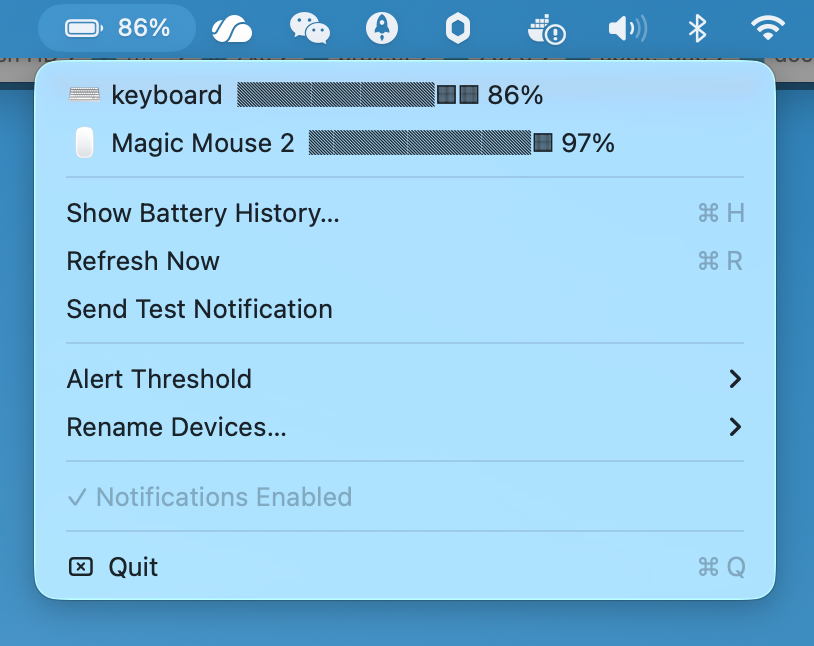
BatteryMonitor sits quietly in your menu bar, keeping a watchful eye on every Bluetooth device connected to your Mac — keyboard, mouse, trackpad, and more.
macOS tells you nothing about your Bluetooth accessories until it's already too late. BatteryMonitor fills that gap — always visible, never intrusive.
Keyboard, mouse, trackpad — see every Bluetooth device's battery level instantly from the menu bar, no digging through System Settings required.
Track how your devices drain over time. Visualize battery trends with a clean history chart so you can predict when to charge before it matters.
Get notified the moment a device drops below your threshold — once per charge cycle, so alerts are meaningful and never spammy.
Set your own low battery warning percentage. Whether you prefer 10% or 30%, BatteryMonitor respects how you work.
Tired of "Magic Mouse 2" and "Apple Keyboard"? Rename any device to something that makes sense for your setup. Changes persist across sessions.
Lives in your menu bar, uses negligible CPU and memory. No background services, no bloat. Just the information you need, exactly when you need it.
No configuration required. No account. No subscription. Download, open, and you're done — BatteryMonitor works immediately.
Free download. Open the disk image, drag BatteryMonitor to your Applications folder.
BatteryMonitor appears in your menu bar immediately. Click to see all connected Bluetooth devices and their current battery levels.
Configure your alert level once. BatteryMonitor will notify you when any device gets low — and stay quiet the rest of the time.
Free. Signed. No account required.